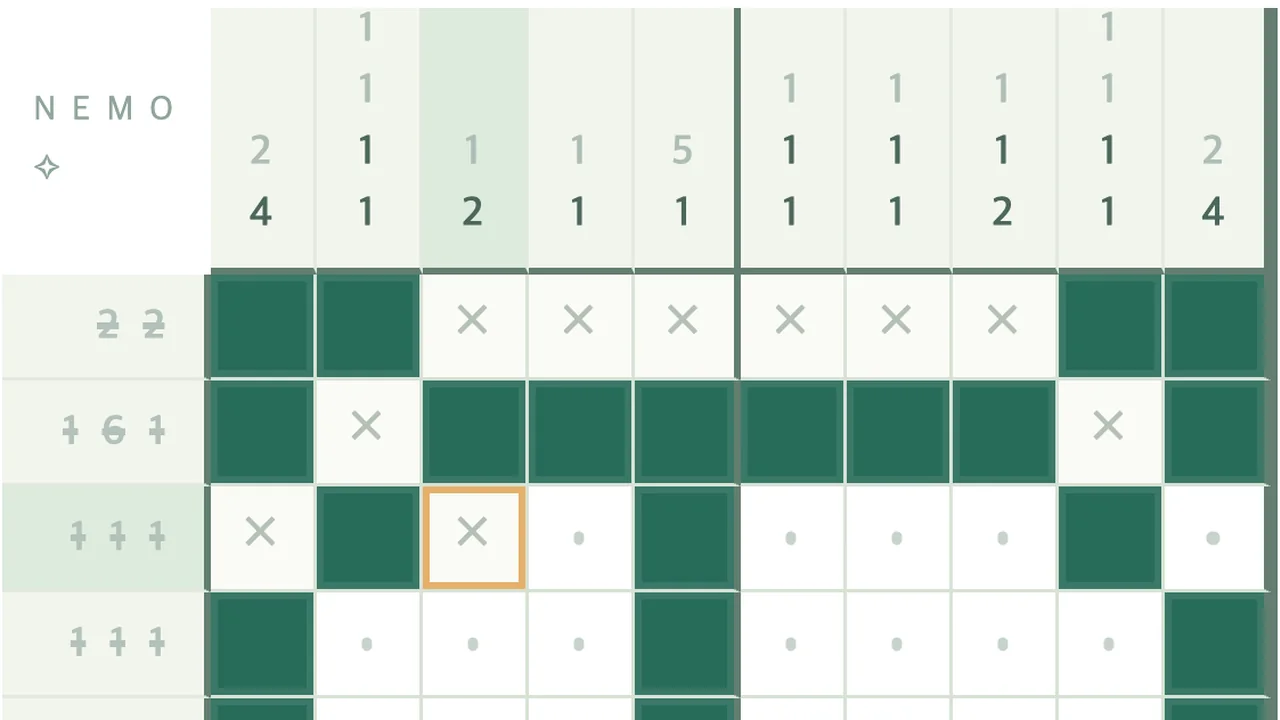
The one rule behind every deduction
In NEMO a square is settled the same way the game’s own solver settles it. Take one row or column, list every arrangement of its clue that fits the marks already in that line, and lay them on top of each other. A square that is filled in every arrangement must be filled; a square that is empty in every arrangement must be empty. Everything else is still open.
Each of the 100 pictures was accepted only after this procedure, repeated over rows and columns, finished the whole grid from the clues alone. No picture requires a guess. When you feel you have to guess, there is a line you haven’t read yet, or a mark that is wrong. The hint panel uses the same language: “Compare the overlap of N possible arrangements.” Below, squares are numbered from the left or top, starting at 1.
Counting the overlap without listing anything
Listing arrangements is slow, but one subtraction does the job on an empty line. Add the clue numbers, add one blank for each gap between them, and subtract the total from the line length. The result is the slack: how far each block can slide. Any block longer than the slack has (block − slack) certain squares in its middle.
- 7 in a 10-square line: slack 3, so squares 4–7 are filled.
- 3 4 in 10: 3 + 1 + 4 = 8, slack 2. One square of the 3 (square 3) and two of the 4 (squares 7 and 8) are certain.
- 5 3 4 in 15: 5 + 3 + 4 + 2 = 14, slack 1. Four, two and three squares are certain, nine in all.
- 2 2 in 5: slack 0. The line fits exactly: filled, filled, empty, filled, filled.
- 0: the whole line is empty.
How far the first pass takes you
Exact fits are worth finding first. Across each tier’s 20 pictures I counted the lines with zero slack: 49 of 200 on Intro, 54 of 320 on Easy, 53 of 400 on Normal, 47 of 480 on Hard and 30 of 600 on Expert. Lines with a clue of 0 number 8, 6, 22, 18 and 26.
If you apply only the overlap count to every row and column of an empty board, each line on its own, you settle 60.0% of the squares on Intro, 48.8% on Easy, 47.8% on Normal, 45.4% on Hard and 31.0% on Expert (totals for each tier, counted with the game’s line code). On a 15×15 board, then, more than two thirds of the work comes from feeding squares settled in one direction back into lines in the other.
So switch axis whenever a stroke settles something. A square you fill in row 4 is new information for its column; read that column before carrying on down the rows.
Edges and crosses: shrinking the slack
Once a line has marks, the overlap count works on the space that is left, not on the whole line. Two patterns come up constantly.
- A filled square near an edge. Clue 4 in 10 squares with square 2 filled: the 4 must cover square 2, so it starts at square 1 or 2. Squares 2–4 are filled and squares 6–10 are empty.
- An empty square that cuts the line. Clue 3 in 8 squares with an × on square 3: squares 1–2 are too short for a 3, so they are empty, and the 3 sits within squares 4–8, which fills square 6.
Why crosses matter even though they are optional
A picture counts as finished as soon as your filled squares match it; crosses are never checked, in Stages or by the server. But a cross removes arrangements, and on a big board the second pattern above is often the only way forward. The cross tool is X on a keyboard, or right-click and right-drag with a mouse.
What fading numbers and struck lines really mean
Both kinds of feedback are worked out from your marks, never from the answer. A single clue number fades when every arrangement that still fits your fills and crosses puts that block in the same place and your fills already cover it. A whole clue is struck through, the line’s blanks get dots and a chime plays when the filled squares in that line form exactly its clue.
The second one catches people out. A struck line only means the line agrees with its own clue. In a row whose clue is 1, any single filled square strikes it; if the column through that square disagrees, the strike is wrong and the picture will not finish. Trust a struck line only when the lines crossing it agree too.
Using the hint without losing a star
Pressing Hint changes nothing on the board. It names a line, says how many arrangements of its clue still fit your marks, highlights every square in that line those arrangements agree on, and marks one target. Only “Apply one square” fills it and adds one to your hint count, and a run with any hints cannot earn the second or third star. You can read the highlighted squares, close the panel and fill them yourself.
The hint checks rows from top to bottom, then columns from left to right, and stops at the first line where something can be settled.
If you did apply a hint, Restart (New attempt on a solved picture) clears the board, the clock and the hint count. Stars come from your best saved runs, which is why the confirmation says “Your best record is preserved.”
When the hint says your marks are wrong
Before offering a square, the hint runs line logic forward from your marks across the whole board. If some line is left with no arrangement that fits, the panel says “Your current marks don’t match the clues” and names that line. Below it, “Recent marks on this line” lists up to eight of your recent strokes that touched it. Choosing one previews undoing that stroke’s squares on the line; Clear line marks previews wiping it. Nothing changes until you press Confirm.
I tested this with the game’s logic code on 4,000 positions across all 100 pictures, each made of correct marks plus one wrong mark. The hint reported a contradiction every time. The named line contained the wrong square in 71–79% of cases, depending on the tier; otherwise the mistake sat in a crossing line and the conflict surfaced further along. If undoing on the named line doesn’t help, check the lines that cross it.
The other message, “No square can be decided right now,” cannot appear while all your marks are correct: line logic finishes every picture from an empty board, so it also finishes from any correct partial one. It never appeared in 2,000 random correct positions. If you see it, at least one mark is wrong. Keep in mind that only your last 20 strokes are saved for undo when the page reloads.
Input habits that cause wrong marks
- With a mouse, a drag follows the pointer, so a stroke that drifts diagonally marks squares in the next row. On touch screens the first direction locks the stroke to one row or column.
- A stroke that starts on a square already holding the current tool’s mark erases along its whole length. Start long strokes on an unmarked square.
- On large boards, stop on the number shown in the length badge while you drag instead of counting squares.
- A second finger on a touch screen pans the board and cancels the stroke you had just started.
- With a controller, A applies the current tool, X toggles a cross, Back cycles Fill, Cross and Erase, Y opens the hint, and LB and RB undo and redo.
A first session, step by step
- Start on Intro: with 60% of squares open to the first pass, it is where the overlap count becomes automatic.
- Read the board before your first mark, since the Stages clock does not start until your first stroke. Then cross out every 0 line and fill every exact fit.
- Run the overlap count on every clue with a small slack, then switch axis after each stroke that settles something.
- Cross out any gap too short to hold the smallest block in its line.
- When stuck, open Hint and read it before applying.
Daily puzzle and friend races
The daily is always a 10×10 picture, one of the 20 Normal stages (41–60), so Normal is the tier to practise for it, without the hint, because the daily has none. Those pictures’ three-star targets in Stages, 3:30 to 4:00, make a useful yardstick.
A friend race uses one random picture from Easy, Normal, Hard or Expert; Intro is not offered. Hints and pause are off. The bar beside each name is the share of squares holding any mark, fills and crosses alike, so it doesn’t show who is closer to the answer. The server declares the winner as soon as one board’s filled squares match the picture, without looking at crosses, so in a race cross only the squares a deduction needs. A finish faster than 0.2 seconds per filled square, or with fewer changed squares than the picture has filled squares, ends with no winner.
Play it yourself