The sheet in numbers
Table Curling runs on a fixed sheet 360 units wide and 660 tall, the same in the browser and on the server. A stone is 26 units across. Every stone starts from the same delivery point on the centre line, 420 units below the button. The house has a radius of 102, a little under eight stone widths across. The red hog line is 140 units above the delivery point, and your drag starts anywhere below it.
Two things work differently from curling on real ice, and both change how you should play. Stones travel in straight lines and do not curl. And the wooden bumper around the sheet does not bounce anything back: a stone that reaches it, on any side, is out of play.
Weight: what the percentage means
While you aim, the meter shows Weight as a percentage. A thrown stone leaves at a speed of 120 plus 420 times the weight and slows at a constant rate until it stops. From that formula, for a stone that hits nothing:
- About 66–67% stops on the button.
- About 53% is the least that reaches the house (the stone just touches the outer ring); about 54% stops on the front of the ring.
- About 77% stops on the back of the ring, and about 79% is the most that still touches it.
- About 82% or more reaches the top bumper and goes out.
- Near the button, each 1% moves the stopping point about 9 units, a third of a stone width.
Aiming and the dashed circle
The drag works like a slingshot: press below the hog line and pull down and away from your target, so pulling down and to the left sends the stone up and to the right. The angle is limited to about 37 degrees either side of the centre line. A short pull already gives 25% weight, and pulling back 150 units, a little under a quarter of the sheet’s height, gives 100%. To cancel, slide back to where you pressed and let go.
With a keyboard, every turn starts straight down the centre line at 66%, which is almost exactly a button draw. Left and Right turn the aim by 0.008 radians, about 3 units sideways at the house; Up and Down change weight by 1%. Hold Shift for finer steps. Space or Enter throws. On a gamepad the left stick aims and sets weight, and A throws.
The dashed line and circle show where your stone would stop if it touched nothing. The guide ignores other stones, so when the circle sits behind a stone, expect a collision instead.
Collisions, take-outs and the bumper
All stones weigh the same. When two meet, 94% of their closing speed along the line between their centres passes to the stone that was hit. On a full, head-on hit the thrown stone keeps almost none of its speed and stops about where it made contact, which gives you a “hit and stay” without trying. Two examples from the game’s own simulation, with an opponent stone on the button and your stone thrown straight at it:
- At 80% the target slides to the back of the sheet but stays in play, outside the house. Your stone stops about one stone width in front of the button, in the house.
- At 95% the target hits the top bumper and is removed. Your stone again stays near the button.
Guards work because nothing curls
Since every stone starts from the same point and travels straight, a stone between the delivery point and the button covers it completely. I checked this in the simulation with a stone on the button and a guard on the centre line 160 units in front of it: sweeping the throw angle across the target in steps of 0.001 radians, no throw moved the target without hitting the guard first.
So a stone behind a guard can only be moved by knocking another stone into it, and the direction of that push is hard to control. Placing a guard in front of your counting stone is often worth more than adding a second stone to the house.
How an end is scored
When the last stone of an end stops, the game counts every stone in play whose centre is within 115 units of the button, which means any part of it touches the outer ring. The stone closest to the button decides which team scores, and that team gets one point for each of its stones closer than the opponent’s closest counting stone. Only one team scores per end. If no stone touches the house, the end is blank.
You never have to measure by eye. While you aim, the dock shows the current count, such as “Coral lying 2” or “No one scoring yet”, and the stones that would score glow gold.
Order, the hammer and two ends
A game is two ends. Teams alternate throws, four stones each in 1:1 and 2:2 and six each in 3:3. In 2:2 the order is Coral 1, Mint 1, Coral 2, Mint 2, repeated; in 3:3 it runs through all six players and starts again, so everyone throws twice per end. The team that scores an end throws first in the next one, which hands the last stone, the hammer, to the team that was scored on. After a blank end the order stays the same. Equal totals after two ends make a draw; there is no extra end.
The hammer matters because the last throw of an end cannot be answered. Against the computer you are Coral and throw first in end 1, so the computer has the hammer. If you score in end 1, it keeps the hammer for end 2, and your last stones should go where they are hardest to remove: behind a guard rather than alone on the front of the ring.
How the computer chooses a throw
The computer does not follow a script. Each turn it simulates a grid of throws, angles within about 17 degrees of the centre line and weights from 46% to 90%, with the same physics as yours. It rates each result: 10 points per stone it would score, minus 9 per stone you would score (minus 14 in the last two throws of an end), a small bonus for its closest stone, and, before those last throws, a bonus for its own stones in a strip just in front of the house. The levels then differ:
- Easy picks at random among the best 30% of throws, then misses by up to 0.03 radians (about half a stone width at the house) and 4.5% weight.
- Normal picks among the best 6%, with errors up to 0.011 radians and 1.6%.
- Hard always takes the best throw, with errors up to 0.004 radians and 0.6%.
Common mistakes and why they happen
Most points lost in early games come from a few habits, each with a cause in how the sheet works.
- Throwing hard to be safe. Above about 82% a stone that misses goes out off the top bumper.
- Playing a bank shot. Touching a side bumper removes your stone, so there is no angle off the edge.
- Trusting the dashed circle in traffic. It shows where your stone would stop if it hit nothing, not where it ends after a hit.
- Leaving your only counting stone open on the centre line. Any straight throw at it has a clear path.
- Running out the clock online. Each throw has 20 seconds; when time runs out, “Time ran out, a stone was skipped” appears and that stone is gone for the end.
Your first games, alone or with friends
Start with Play the computer on Easy. Throw your first stones at 66% to learn the button weight, then try 80% hits on stones in the house. Games against the computer or on one device have no time limit and pause when you switch tabs. In Share one device, two to six people pass the phone, and the header shows whose throw it is, such as “Coral 2’s turn”.
To play online, choose Invite friends · online, pick 1 : 1, 2 : 2 or 3 : 3 and create a room. The lobby shows a four-character code with Copy link and Share buttons. Codes leave out I, L, O, 1 and 0, so they are easy to read aloud. A friend opens the link, or types the code on the first screen under “Got an invite code?” and presses Join. Seats fill in arrival order: the host is Coral 1, the next player Mint 1, then Coral 2, and so on. When the last seat fills, a three-second countdown starts the match; nobody presses start.
During the match you can send five quick reactions (Hi, Nice, Wow, Oops, GG). In 2:2 and 3:3, teammates who are not throwing can use “⌖ Call a shot” and tap a spot for the thrower. Leaving mid-game counts as a forfeit; in team games the turns of a player who left are skipped, and if a whole team leaves, the other team wins. A rematch starts once every player presses Play again.
Play it yourself
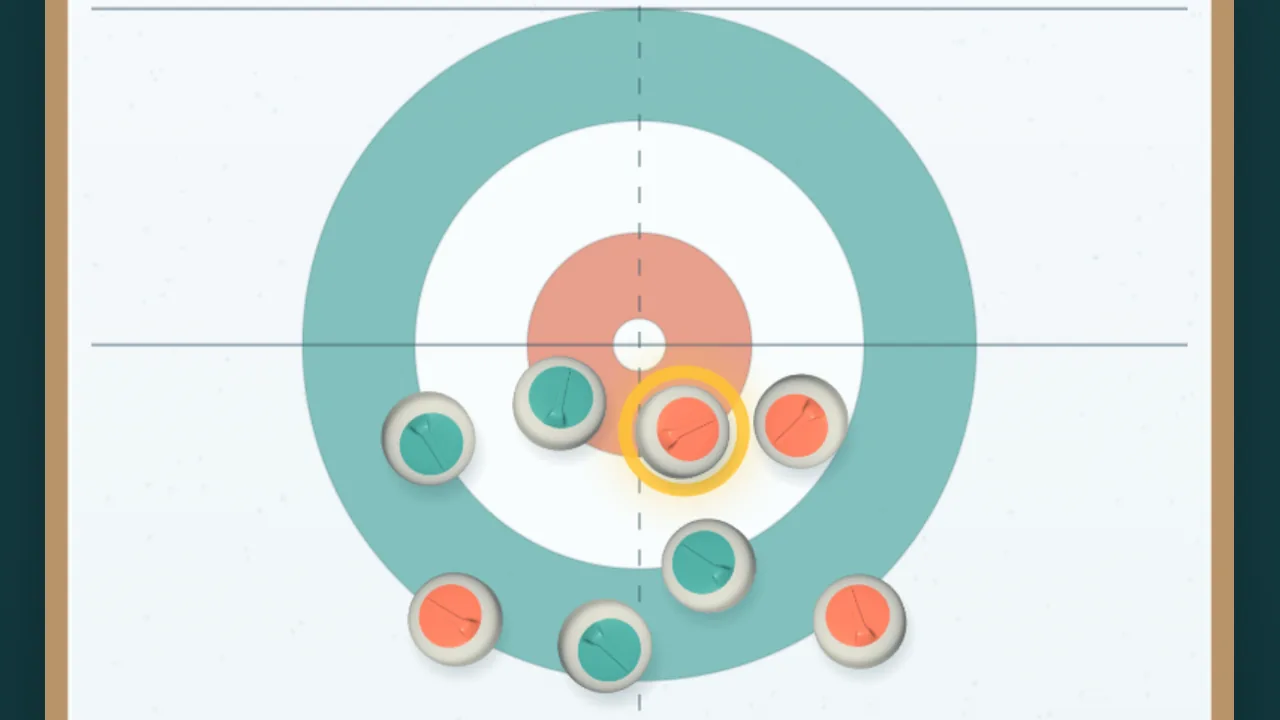
Table Curling
Pull back and release for a quick game of table curling. Play the computer, share one device, or invite friends by link or code for 1v1, 2v2 and 3v3 over two ends.